Creating a JMeter test plan for an API invocation through WSO2 API Manager

The use-case :
  • Create an API for a REST endpoint and publish it from API-Publisher app
  • Then subscribe to it from API-Store app and generate a key
  • Finally create a test-paln from jmeter to this API invocation with using OAuth access token.
Pre-Requesties :


Steps :
  1. Deploy the backend JAX-RS Endpoint    
  • First download and extract above two servers and to run both servers simultaneously,change one server's port offset to 1 by navigating to {Product_Home}/repository/conf/carbon.xml .
  • Then download the sample JAX-RS war file from checking out it from here and deploy it to WSO2 AS -4.1.2  
  • This sample JAX-RS contains three REST endpoints and here I'm going to use its endpoint of getting menu list as '/pizzashack-api-1.0.0/api/menu/'.Once you deployed the war file,you can check accessing   'http://yourip:port/pizzashack-api-1.0.0/api/menu/'  from browser whether you get a successful json response or not.

     2.  Create the API for backend JAX-RS endpoint
  • Browse api-publisher web UI from browser and create a new API with setting its endpoint as  'http://yourip:port/pizzashack-api-1.0.0/api/menu/' 
Add API
       
  • Publish it to API-Store.
Publish API
     
  • From API-Store,subscribe the created API to an application and generate an access token.So now you are ready to invoke the API.


Subscribe to API
User Subscriptions

     3.  Create JMeter Test Plan
  • Start jmeter with jmeter.sh script and browse jmeter UI. Add a new test-pan.
  • First add a new thread group by navigate to Add->Threads (Users) ->Thread Group  


  • Since we are going to send a RESTful[HTTP] request to the create API,click on thread group ,select the   sampler as HTTP Request and add the ip address,port and path accordingly as shown in below image.
          From this example we are doing a GET request.So no need of request parameters.
Add HTTP Request
After setting REST URL for the request
                              
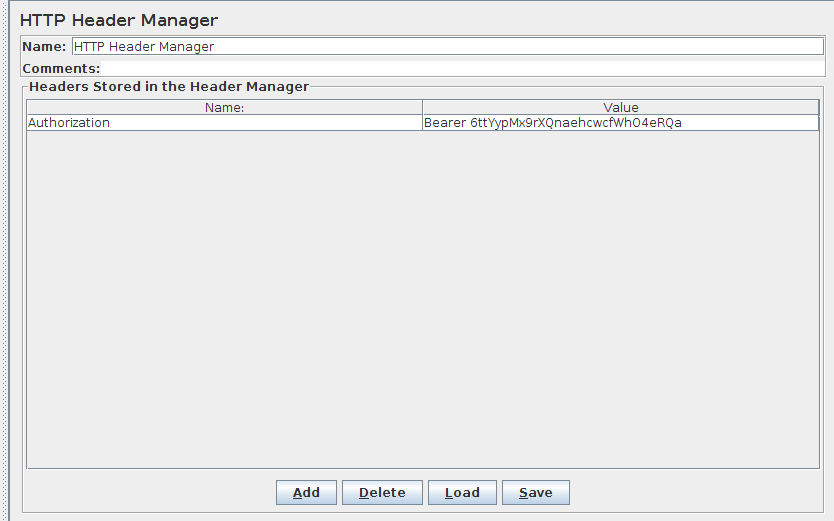
  • Then we need to add the access token for request header.That can be done by adding the config element called 'HTTP Header Manager' to the thread group as below.
Add HTTP Header Manager


  • Then click on 'add' button of the  'HTTP Header Manager' UI and add ;
         header name -"Authorization"
         value            - "Bearer "+accessToken
        
After adding the authorization header

  • Now we have finished configuring test-plan,save all of them and now remaining is running the test-plan.To collect test running results you can add a Listener for thread group as 'View Results Tree' or 'View Results Table' or either graph.Just change number of threads/iterations and see how the average time,other performance values varying on each.


  • You can find the above created JMeter test plan by checking out it from here.

Comments

  1. Any idea on how to work with oAuth2 authentication for cloud based application using JMeter?

    ReplyDelete

Post a Comment

Popular posts from this blog

Passing end-user details from client to real backend endpoint via JWT token

In real-world business system,WSO2 API Manager useful on exposing company APIs, in a secured and controlled manner with the features provided by APIManager as; OAuth support [To secure API invocations] Throttling support [To control API invocations] Monitoring support [To track API usage] More technically what happening is when a user sends a particular API request,it will goes to WSO2 APIManager node and from there,the request will route to the real implemented back-end endpoint of the particular API and get back the response and returned it to the API invoked user. There can be a use-case,that this back-end endpoint may expect the details of API invoked user as to pass those details to some internal company usage  as; Additional authentication/authorization Track usage data from an internal system. So how to support above requirement from WSO2 AM. There comes the use of JSON Web Token[JWT] implementation done inside WSO2 AM. JWT is a means of representing claims to...

TPP Journey through WSO2 Open Banking

Introduction 2018 is all set to be a game-changing year for European banking. The Revised Payment Services Directive (PSD2) has opened the door to new third party providers [TPPs] to connect with banks and manage finances of bank customers on behalf of them. The PSD2 regulation has mandated banks to expose their core-banking account data and payment services to authorized TPPs to consume. Thus as a bank it’s essential to have a solution which will securely expose their internal banking services to third party providers in a trusted manner. WSO2 Open Banking solution provides all required components to expose bank APIs in a well secured manner in order to become PSD2 compliant. This article explains about the importance of the TPP role in PSD2 domain, the requirements set that banks need to provide for TPPs by PSD2 regulations and how WSO2 Open Banking solution supports these requirements.  From my last blog ,I have given an introduction for PSD2 and WSO2 Open Banking soluti...

How to rollback/commit processing messages from WSO2 ESB when enabled JMS transaction

This blog post describes the below use-case where WSO2 ESB 4.6.0 act as the intermediate channel in-between two JMS queues. The Use-case First messages will be de-queue to a proxy service deployed in WSO2 ESB from an queue in ActiveMQ message broker. Then inside ESB,the incoming messages will undergo with some message mediation flow and then the message will be send to another JMS queue deployed in JBoss server. Inside the ESB,following failures could be happen;            a) Failures during message mediation process failure inside ESB [for example if you                use   dbreportmediator/lookup mediator inside mediation flow,some times failures can                happen due  to database connection failures]          b) Message sending failure,due to endpoint is unavailability.[For example,the JBoss  ...